How does virtual memory even work?
a guide to virtual memory, page tables, TLBs, page faults, and copy-on-write
We never have unlimited RAM, right? We have physical RAM, which is limited and shared by many programs. So how do we get the feeling that memory is unlimited? Here is where we use virtual memory, which kind of emulates an infinite memory space.
The idea is very simple. Programs use virtual addresses. The hardware and the operating system translate them to physical addresses in memory.
Your program might access an address like 0x7F12A040, but that does not usually mean it is that byte number inside RAM. It is just a virtual address inside that process's address space. The CPU and the operating system have to figure out where the corresponding data actually lives.
Virtual Pages
Your virtual memory is divided into fixed-size blocks called pages. Usually, these are 4 KB in size. Physical RAM has equivalent blocks called frames.
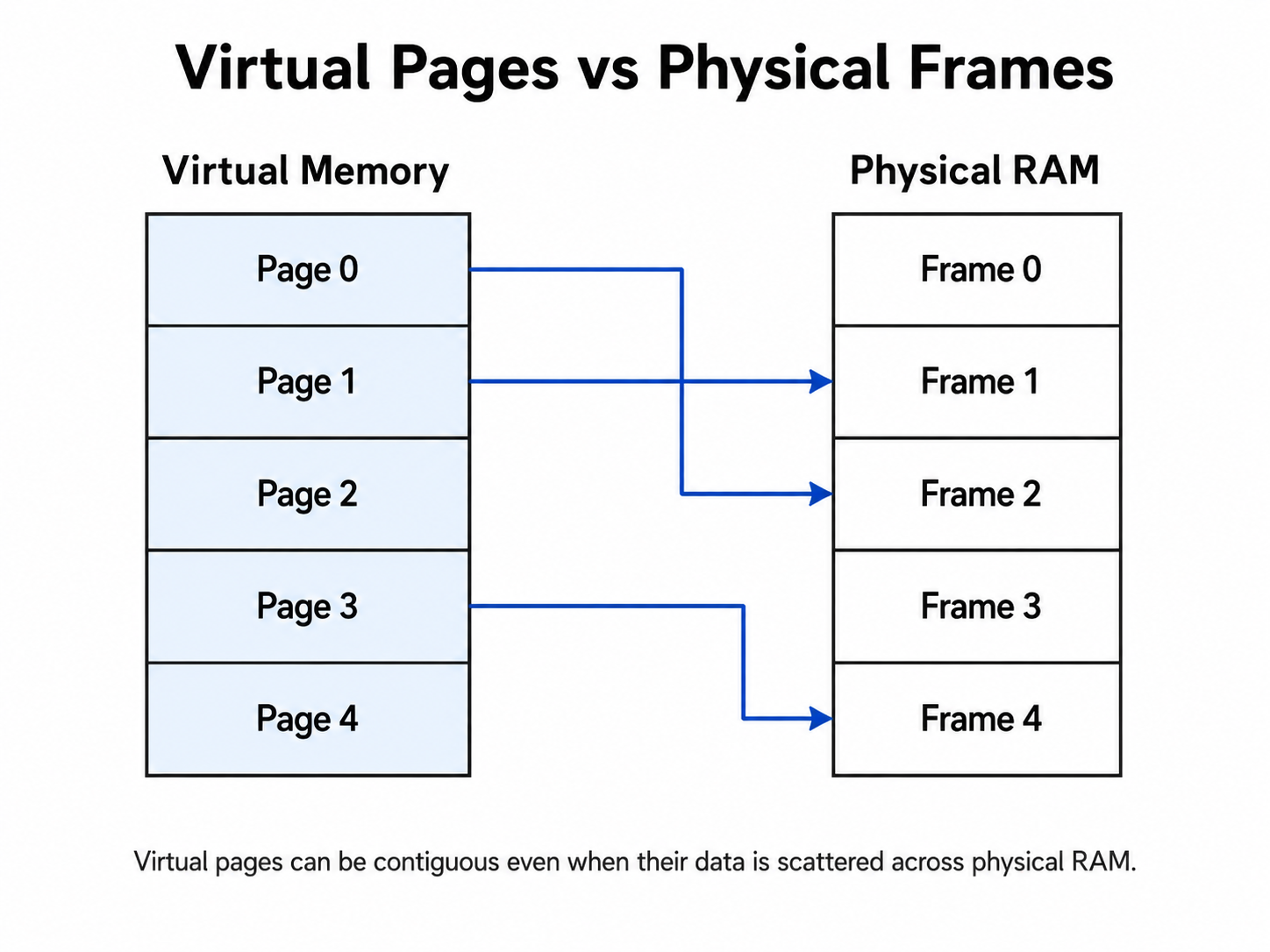
One important concept is that you don't have to store the virtual pages next to each other inside RAM. For example, we can have this scenario:
Virtual Page 0 -> Physical Frame 42
Virtual Page 1 -> Physical Frame 107
Virtual Page 2 -> Physical Frame 8
Virtual Page 3 -> Physical Frame 19
To a program, these pages will always appear to form one continuous region of memory. Physically, however, they can be scattered across the RAM. This level of abstraction means that programs never need to care about the actual layout of physical memory.
The Page Table
How will the CPU know where a virtual page is? Here we have a data structure of sorts called the page table. Every process has its own page table mapping, maintained by the operating system itself. Conceptually, it looks something like this.
| Virtual Page | Physical Frame |
| 0 | 42 |
| 1 | 107 |
| 2 | Not Present |
| 3 | 23 |
When the CPU generates any virtual address, the address is divided into two parts:
- A virtual page number
- A page offset
The virtual page number identifies the page, and the offset identifies the exact byte inside that page.
If the pages are 4 KB in size, 4 KB is equal to 2^12 bytes, so the lowest 12 bits of this address will be the offset. The upper remaining bits will identify the virtual page. The page table converts the virtual page number into a physical frame number. That is the main work of the page table.
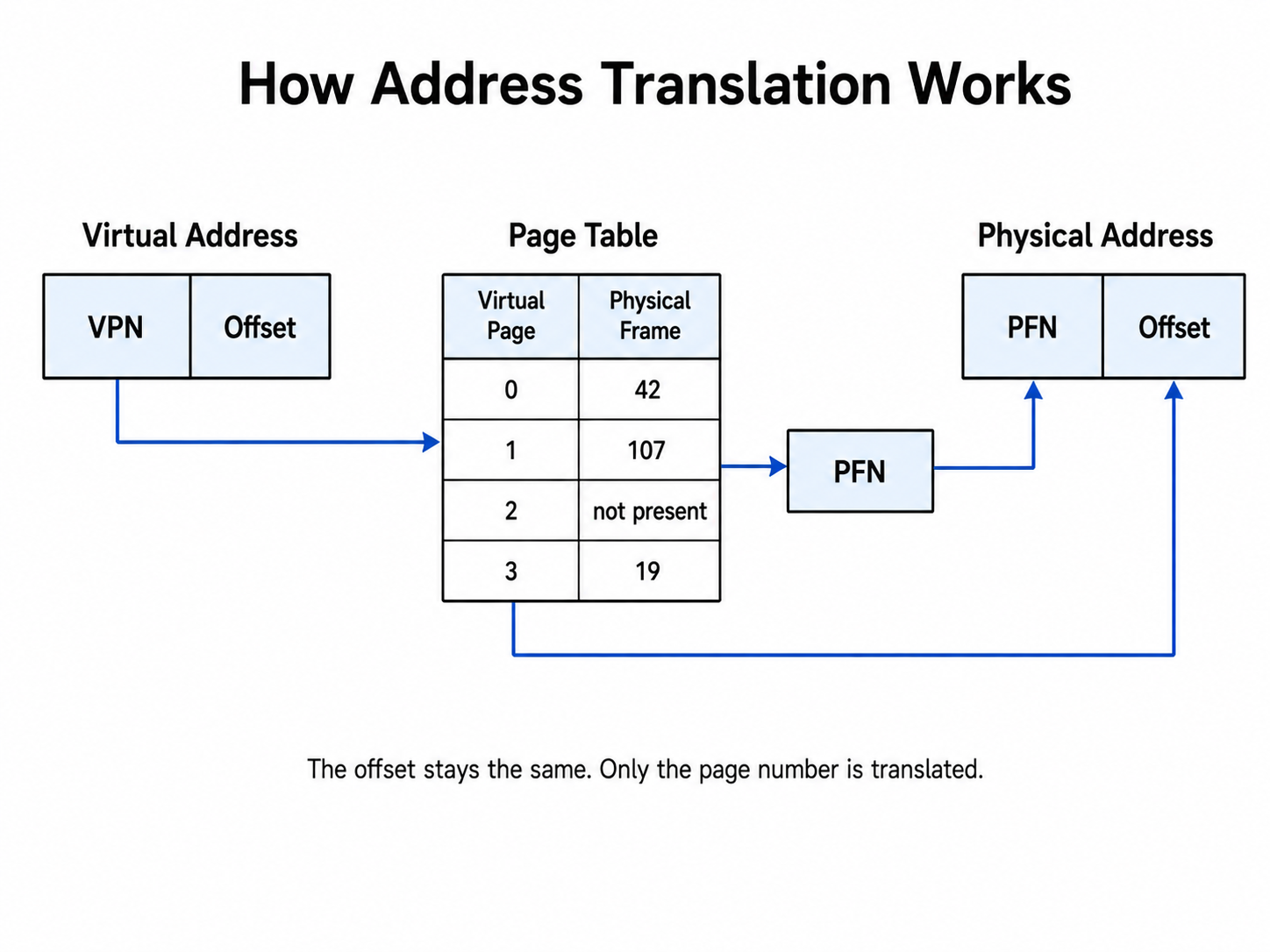
One fun fact: the offset never changes. Only the page number is always translated conceptually. The VPN only changes to the FPN, and another fun fact: the hardware that actually does this is called the memory management unit, or MMU.
Page Lookups are expensive!
Imagine that every time the CPU wanted to access memory, it first had to access memory just to read the page table. Even to perform something like x = array[i], the processor will:
- Read the page table.
- Find the physical address.
- Read
array[i].
This would make memory fetches really slow, so we add a concept called the Translation Lookaside Buffer, or TLB. It's a very small and very fast cache that contains the most recently used virtual-to-physical mappings. Basically, in simple words, it's a short page table.
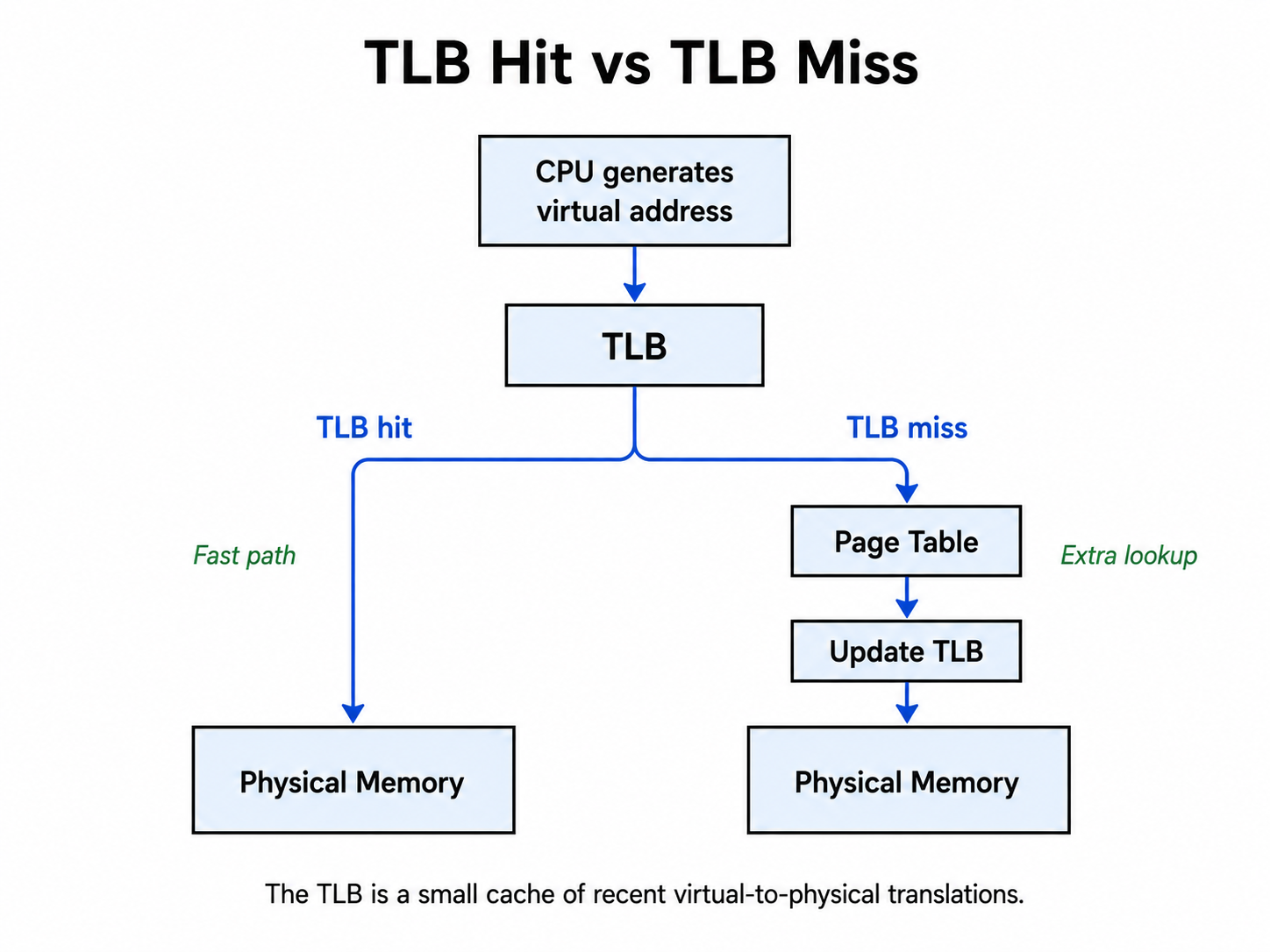
Whenever a CPU generates a virtual address, it first checks the TLB. If the translation exists in the TLB, we get something called a TLB hit, but if the translation is not there, we get a TLB miss. The system then checks the page table in memory. Adding a small, faster cache called TLB in the middle helps CPU performance a lot.
What happens if my page is not in RAM?
Suppose the page does not exist in RAM. When the CPU checks the physical frame number for a virtual page number, there is no physical frame attached to that virtual page. The CPU cannot do a memory fetch or memory access. Here we get something called a page fault.
A page fault transfers control from the running process to the operating system. Suppose the program was executing x = array[i]. The CPU tries to access the page that contains array[i], but the page is missing, so the CPU raises a page fault. The operating system handles it gracefully, makes the page available, updates all the mappings, and then reruns the instruction.
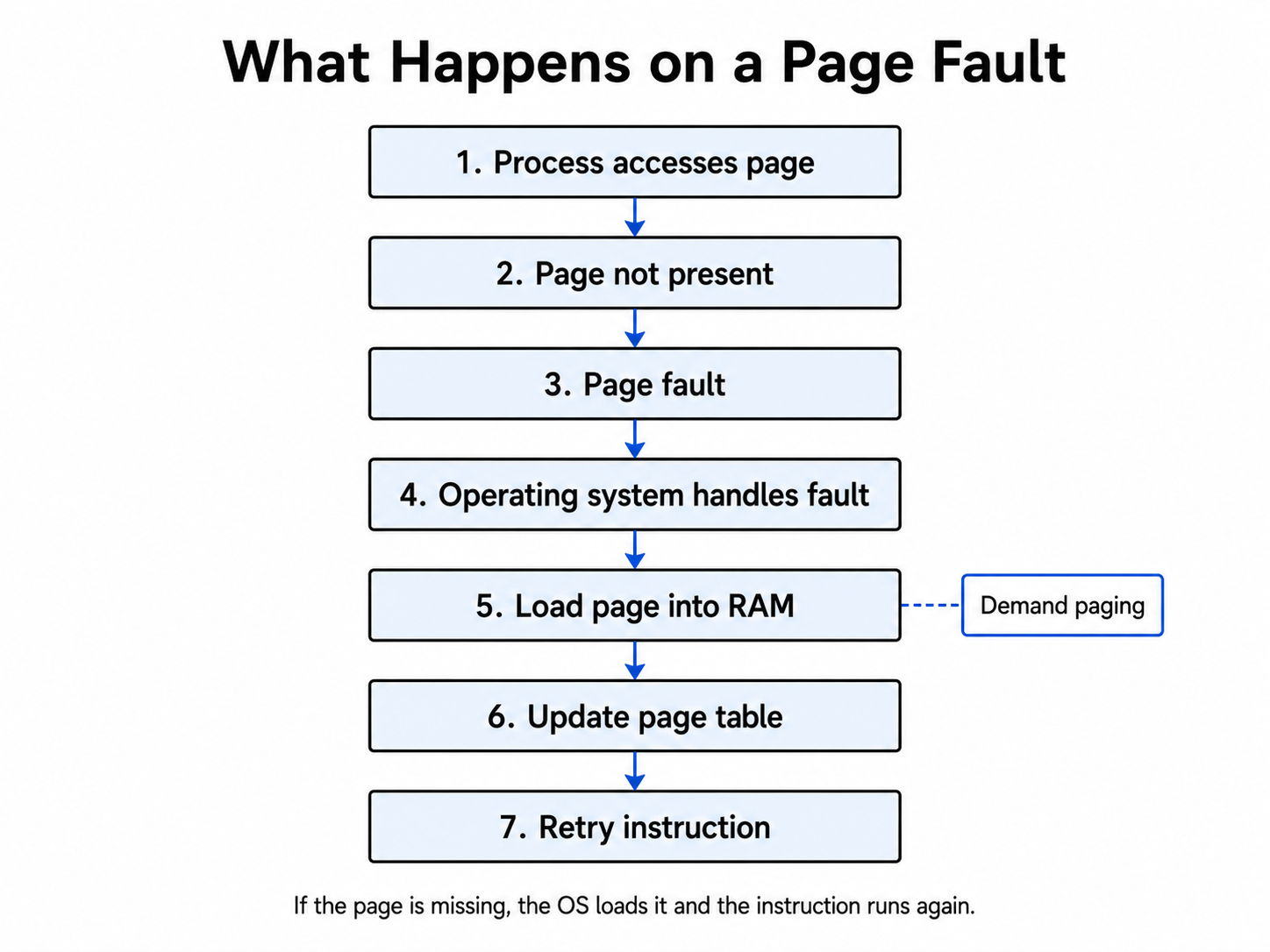
From a user's point of view, the memory is just continuing normally, but here we have a mechanism that handles all the scenarios itself. Pages are loaded into RAM only when they are actually accessed. (very important later on for demand paging)
Every process gets its own address space
One of the most important parts of virtual memory is process isolation. Consider two programs
- Process A: virtual address is 0x400000
- Process B: virtual address is 0x400000
Here, both processes will access the same virtual address, but they can map to completely different locations in RAM.
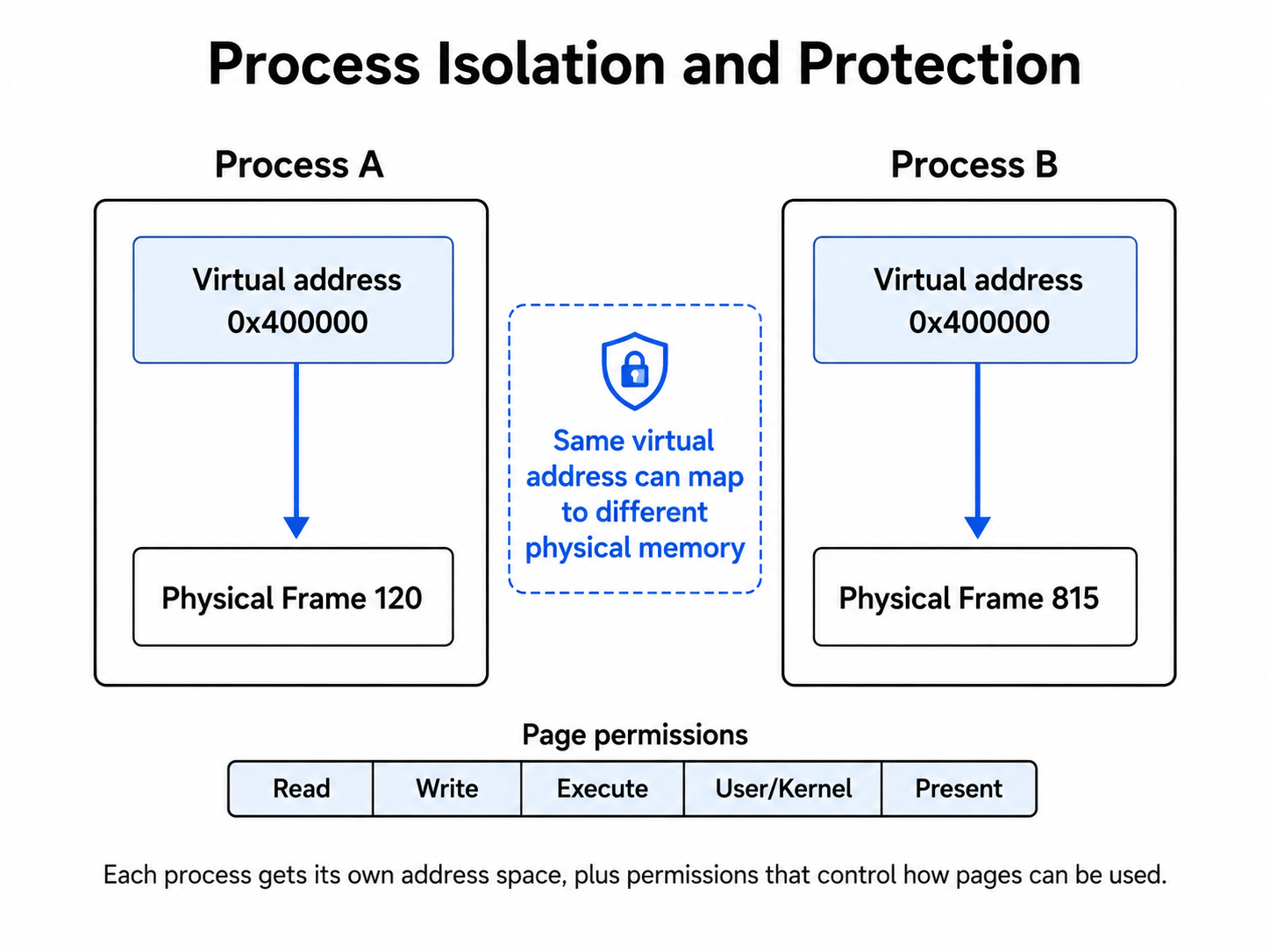
Process A cannot simply access process B's memory just because the page table numbers are the same. The fact that both of them have their individual address spaces makes it possible for them to have the same virtual address but different physical frames attached to it. It is as if each process owns its own entire address space.
Virtual memory can share memory
As you saw, virtual memory provides process isolation, but it can also support sharing. Normally, process A's virtual page can be linked to physical frame 100, and process B's virtual page can be linked to physical frame 200. The operating system can intentionally map both virtual pages to the same physical frame as well.
When is this necessary? With shared libraries, shared memory, or inter-process communication, multiple processes can share the same physical memory without wasting space on duplicate physical copies.
Copy-on-write
One smart way of using virtual memory is the concept of copy-on-write.
Consider the use of fork. When a process calls fork, the operating system creates a child process. A naive implementation would just copy everything inside the parent's memory into the child's memory. If the parent uses 2 GB of memory, that would require copying 2 GB, which is a very expensive process.
Instead, the parent and child initially share the same physical pages, and the pages are marked as read-only. If neither process tries to modify them, no copies are required. Suppose the child tries to write. That write causes a fault. The operating system then creates a private copy of that page, and only the modified page gets copied. This gives rise to the concept of copy-on-write.
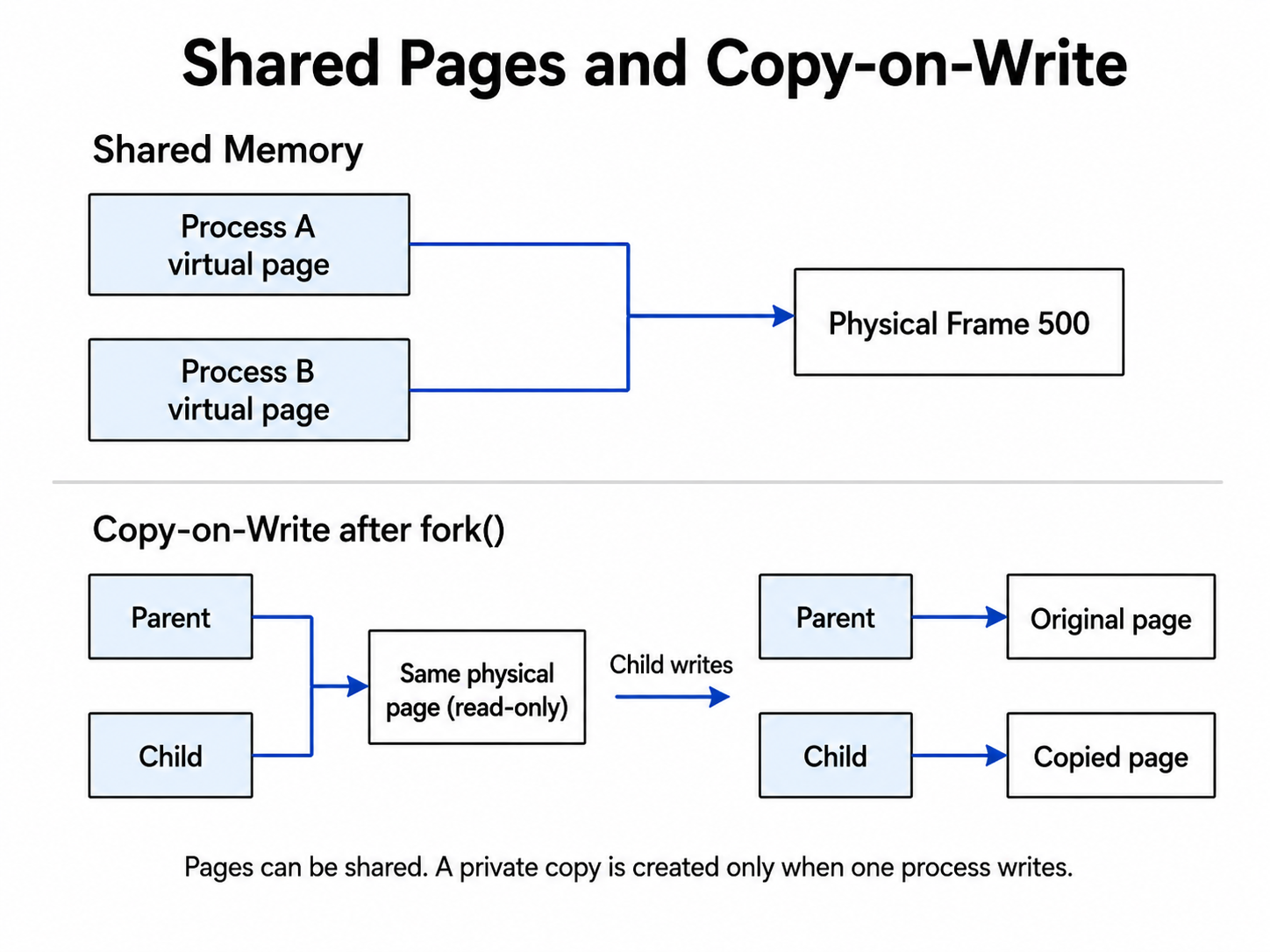
Here, copying happens only when a write arrives. Otherwise, you don't need to copy, and you can save a huge amount of time and resources by avoiding unnecessary copies.
Finally
Putting virtual memory together, we can think of it like this: let's say we are writing this line of code: value=array[i]. Under that single memory access, the machine is doing many steps that the user never sees.
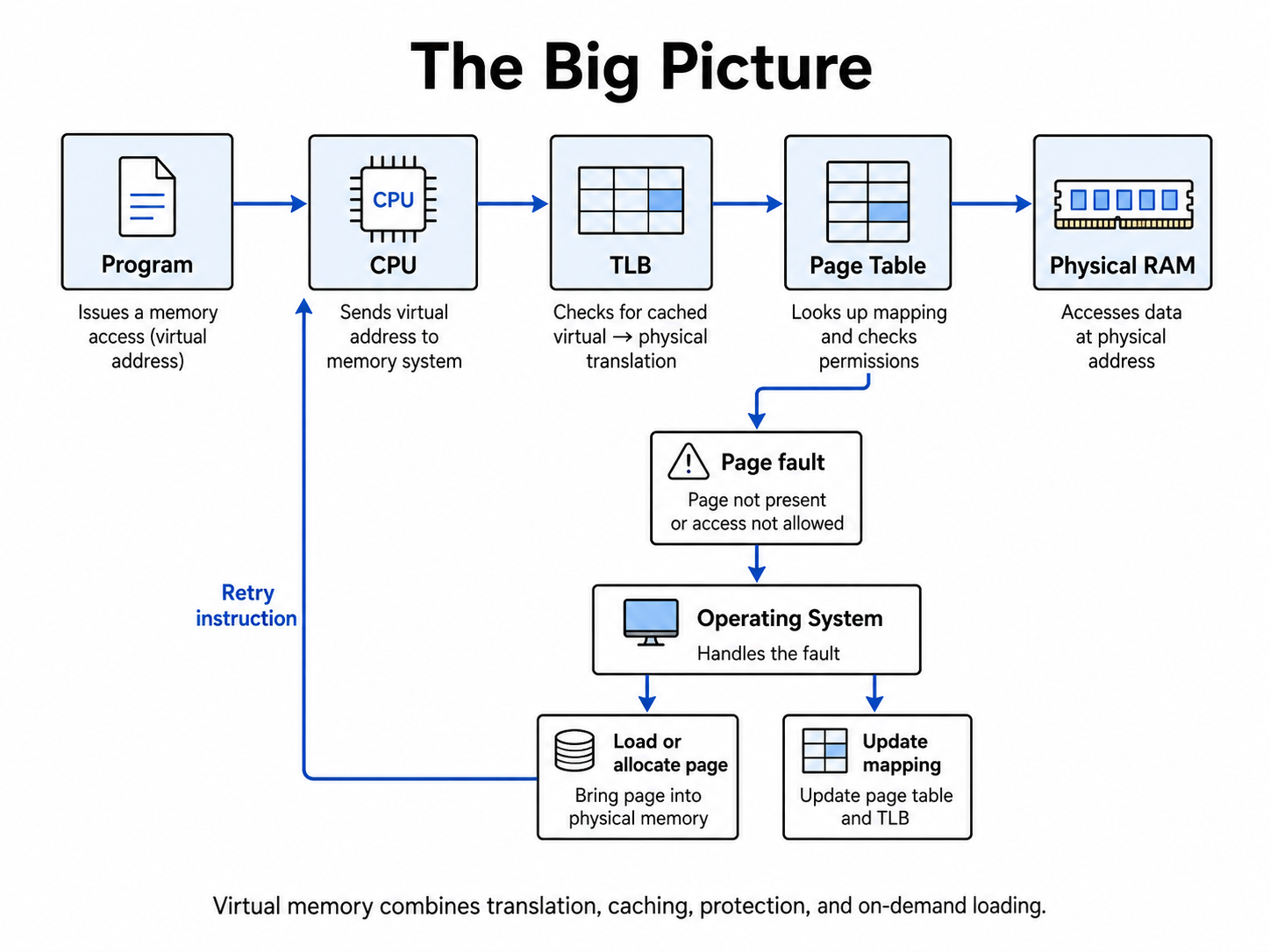
This abstraction gives the operating system very powerful tools:
- address translation
- process isolation
- memory protection
- efficient allocation
- memory mapping
- shared pages
- copy-on-write
- This is one of the most beautiful ways to explain abstraction in the operating system.