LLMs - 1 [Week 8]
a guide into how embeddings, positional embeddings, tokenizer (especially bpe tokenizer) work
It is highly advised you read my earlier blogs on NLP before reading this.
Introduction
You must have used ChatGPT for all your work, but how do you make your own ChatGPT? These are what we call large language models (LLMs).
An LLM is a neural network designed to understand, generate, and respond to human-
like text. These models are deep neural networks trained on massive amounts of text
data, sometimes encompassing large portions of the entire publicly available text on
the internet.
We are going to study LLMs in detail in over 4 blogs now. Below, you can see how an LLM is built and we get a working prototype of any LLM you want to build for your own purpose!
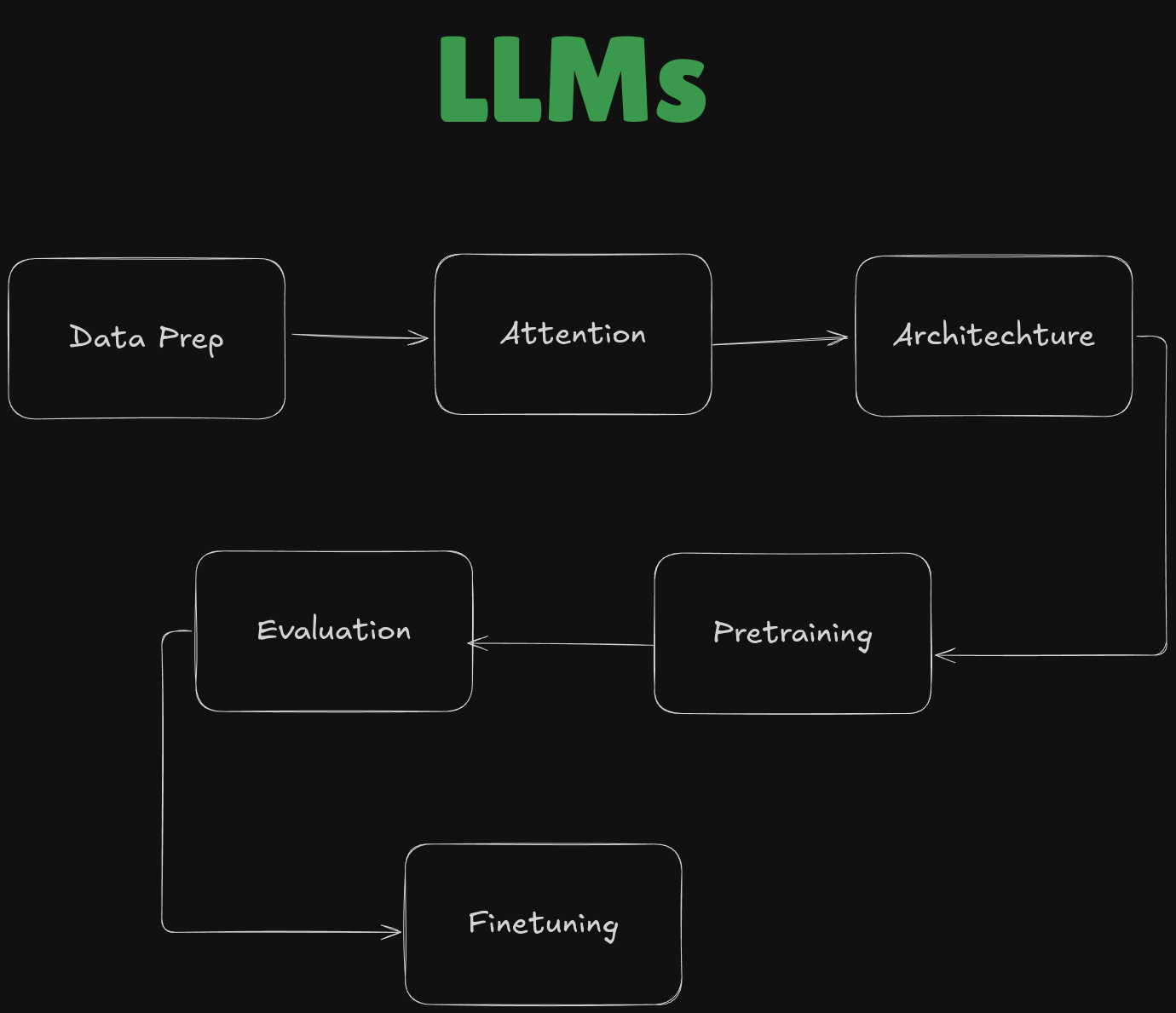
In this blog, we are going to cover the data preparation part only! It will be divided in 6 parts :
- Word Embeddings
- Tokenization
- Build a BPE Tokenizer from Scratch
- Input-Target for Training
- Token Embeddings
- Positional Embeddings
Word Embeddings
The model can’t understand any input we give. Whatever form it is in, we must convert it into some vector for the model to understand it. By this process, we do embedding!
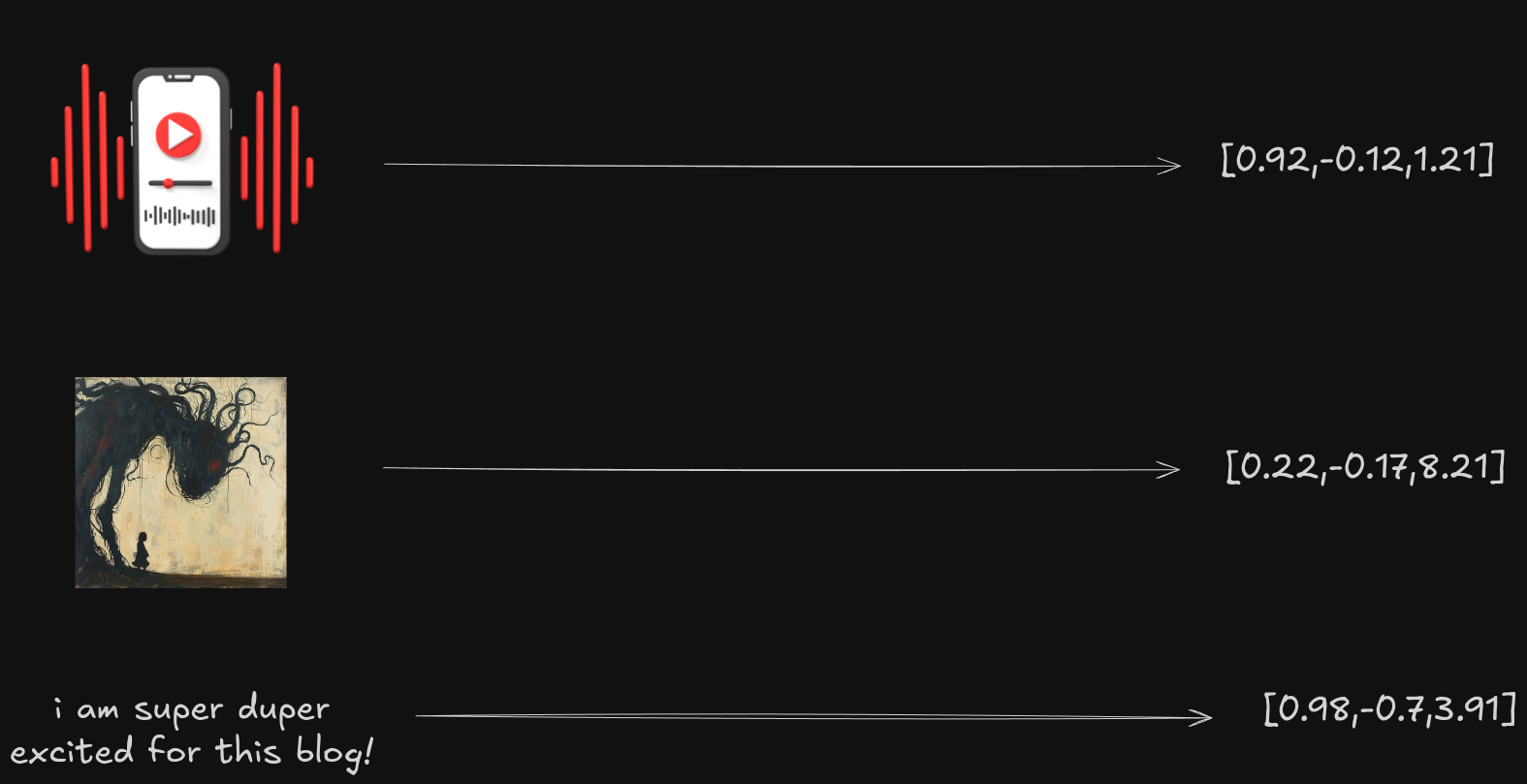
In the case of text, we have architectures, which do this seamlessly! We have already discussed in detail about this earlier in my older blog - Basics of NLP - 1 [Week 5]
Please check it out to learn more details about word embeddings!
Tokenization
Here we will learn how to divide a corpus into individual tokens, these might be special characters or words in general
We will be using a text file (shakespeare.txt), find it here - github.com
Creating the Tokens
Let’s first open the file and see how it looks.
with open("shakespeare.txt", "r", encoding="utf-8") as f:
  raw_text = f.read()
print("Total number of characters:", len(raw_text))
print(raw_text[:99])
Output
Total number of characters: 6446
From fairest creatures we desire increase,
That thereby beauty's rose might never die,
But as
Now we must try to split it into tokens
preprocessed = re.split(r'([,.:;?_!"()\']|\s)', raw_text)
preprocessed = [item.strip() for item in preprocessed if item.strip()]
print(preprocessed[:40])
Explanation for the Regex
Output
['From', 'fairest', 'creatures', 'we', 'desire', 'increase', ',', 'That', 'thereby', 'beauty', "'", 's', 'rose', 'might', 'never', 'die', ',', 'But', 'as', 'the', 'riper', 'should', 'by', 'time', 'decease', ',', 'His', 'tender', 'heir', 'might', 'bear', 'his', 'memory', ':', 'But', 'thou', 'contracted', 'to', 'thine', 'own']
We can see they have been tokenized into individual elements!
Create a Vocabulary
We need to create a mapping of the unique strings we got to some integers now. So that we can use those numbers instead of the strings to denote words in sentences.
words=sorted(set(preprocessed))
print(len(words))
Output
544
So we have 544 unique words in the corpus. Now let’s try to make a dictionary where every integer is mapped to a unique word.
vocab={token:i for i,token in enumerate(words)}We have now created such a dictionary! Let’s see what the first 10 words are
for i,j in enumerate(vocab.items()):
	print(j)
	if(i>9):
		break
Output
("'", 0)
('(', 1)
(')', 2)
(',', 3)
('.', 4)
(':', 5)
(';', 6)
('?', 7)
('A', 8)
('Ah', 9)
('And', 10)
Looks like we achieved our goal!
Create a Tokenizer
Let’s revisit what it should be able to do
- Have a vocabulary
- Have an encoding function [ text to tokens ]
- Have a decoding function [ tokens to text ]
Before we make a tokenizer, we have to keep in mind some of the words might not be in the vocabulary. Hence we should add a special token for them called <|unk|>.
words.extend(["<|unk|>"])
vocab={token:i for i,token in enumerate(words)}
print(len(words))
Output
545
As we see, we have added two new tokens, thus increasing the size of the set to 545!
Now, finally, let’s build the tokenizer
class Tokenizer:
  def __init__(self, vocab):
    self.str_to_int = vocab
    self.int_to_str = { i:s for s,i in vocab.items()}
  def encode(self, text):
    preprocessed = re.split(r'([,.:;?_!"()\']|--|\s)', text)
    preprocessed = [item.strip() for item in preprocessed if item.strip()]
    preprocessed = [item if item in self.str_to_int else '<|unk|>' for item in preprocessed]
    token_ids=[self.str_to_int[s] for s in preprocessed]
    return token_ids
  def decode(self, token_ids):
    tokens=[self.int_to_str[i] for i in token_ids]
    return tokens
In detail,
- str_to_int stores the vocabulary.
- int_to_str stores the inverse vocabulary, mapping strings to integers.
- Under encode,
We first break the text into tokens(like earlier). If any item is not available in the vocab, we assign a
<|unk|>token to it. Finally, we make a list of token_ids and return it in - Under decode,
We just use the inverse vocabulary, to make the sentence back from its tokens
Let’s test it out on some sample data!
text='Hello how are thee my lad'
text
Output
Hello how are thee my lad
tokenizer=Tokenizer(vocab)
print(tokenizer.encode(text))
Output
[545, 268, 102, 458, 336, 545]
We see that we have successfully encoded the text, let’s try to decode it now.
print(tokenizer.decode(tokenizer.encode(text)))Output
['<|unk|>', 'how', 'are', 'thee', 'my', '<|unk|>']
Let’s go! We got back the words. But since, Hello and lad aren’t in the vocab, they get replaced by <|unk|>
But this is a very rudimentary form of tokenization. Let’s delve deep into a tokenization scheme which GPT uses itself - Byte Pair Encoding.
BPE Tokenizer
Byte Pair Encoding, commonly abbreviated as BPE, is a subword tokenization algorithm that originally found its application in data compression schemes.
The algorithm underlying BPE breaks down words that aren’t in its predefined vocabulary into smaller subword units or even individual characters, enabling it to handle out-of-vocabulary words. Hence, even non-sense words can be used as tokens in a BPE tokenizer!
Let’s build one now!
How to make it?
We develop a method to identify the most frequent pairs of adjacent characters, which guides our merging process. By iteratively merging these pairs until reaching the desired vocabulary size, we update our splits accordingly. Finally, we implement a tokenization method that applies the learned merges to new text inputs, allowing us to convert words into subword tokens effectively.
Step 1
First, we need to create a class that will handle our BPE tokenizer. This class will store the corpus, vocabulary size, frequencies of words, and many more.
from collections import Counter

class BPE:
    def __init__(self, corpus, vocab_size, max_iter=None):
        self.corpus = corpus
        self.vocab_size = vocab_size
        self.word_freq = Counter()
        self.splits = {}
        self.merges = {}
        self.max_iter = max_iter
Step 2
Next, we need to count the frequency of each word in the corpus.
def train(self):
    for document in self.corpus:
        words = document.split()
        self.word_freq += Counter(words)

    for word in self.word_freq:
        self.splits[word] = list(word) + ['</w>']
Each word is split into its constituent characters plus an end-of-word token (</w>). This helps distinguish between different words during tokenization.
Step 3
We need a method to find the frequency of adjacent character pairs in our current splits. This will help us identify which pairs are most common.
def get_pairs_freq(self):
    pairs_freq = Counter()
    for word, freq in self.word_freq.items():
        split = self.splits[word]
        for i in range(len(split) - 1):
            pairs_freq[(split[i], split[i + 1])] += freq
    return pairs_freq
By iterating through each word's splits, we can count how often each pair of adjacent tokens appears across all words.
Step 4
Now we can implement the logic to merge the most frequent pairs until we reach our desired vocabulary size.
while len(self.merges) < self.vocab_size:
    pair_freq = self.get_pairs_freq()
    if not pair_freq:
        break
    pair = max(pair_freq, key=pair_freq.get)
    self.update_splits(pair)
    self.merges[pair] = pair + pair
We repeatedly find and merge the most frequent pair until we have reached our specified vocabulary size or there are no more pairs to merge.
Step 5
After merging a pair, we need to update our splits accordingly.
def update_splits(self, pair):
    lhs, rhs = pair
    for word in list(self.splits.keys()):
        new_split = []
        cursor = 0
        while cursor < len(self.splits[word]):
            if cursor + 1 < len(self.splits[word]) and \
               self.splits[word][cursor] == lhs and \
               self.splits[word][cursor + 1] == rhs:
                new_split.append(lhs + rhs)
                cursor += 2
            else:
                new_split.append(self.splits[word][cursor])
                cursor += 1
        self.splits[word] = new_split
This function iterates over all words and replaces occurrences of the merged pair with their new combined token.
Step 6
Finally, we implement the tokenization process that uses our learned merges to tokenize new text inputs.
def tokenize(self, text):
    splits = [list(word) + ['</w>'] for word in text.split()]
    for lhs, rhs in self.merges:
        for idx, split in enumerate(splits):
            new_split = []
            cursor = 0
            while cursor < len(split):
                if cursor + 1 < len(split) and split[cursor] == lhs and split[cursor + 1] == rhs:
                    new_split.append(lhs + rhs)
                    cursor += 2
                else:
                    new_split.append(split[cursor])
                    cursor += 1
            splits[idx] = new_split
    return sum(splits, [])
The tokenize method applies all learned merges to a new input text. It constructs a list of tokens based on the final splits after training.
Example
Let’s test this out!
corpus = ["highest", "higher", "lower", "lowest", "cooler", "coolest"]
bpe = BPE(corpus, vocab_size=17)
bpe.train()

sample_text = "highest higher lower lowest cooler coolest"
tokens = bpe.tokenize(sample_text)
print(tokens)
Output
['highest</w>', 'higher</w>', 'lower</w>', 'lowest</w>', 'cool', 'er</w>', 'cool', 'est</w>']
We have now built a BPE tokenizer from scratch!
Input-Target for Training
We need to tell the LLM while training what my target should be for what input. In the below example, you can see for each time step, the green part is what the LLM gets as input, and the red part is what the target is, essentially, what it tries to predict.
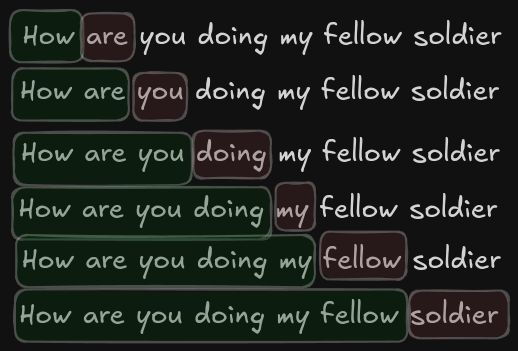
Here you notice we move by one word by one word, but it can be any set. We can move by every 4 words, here we define two terms :
max_length - This is the length of the input sequence, aka the number of tokens we are going to send.
stride - This is how much we are going to move the sequence by
Let’s say we have a max_length of 3 and a stride of 2.
Our example would look something like this
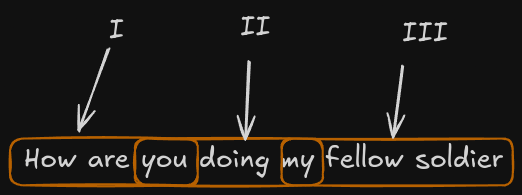
This is how the Dataset class of Pytorch works.
Token Embeddings
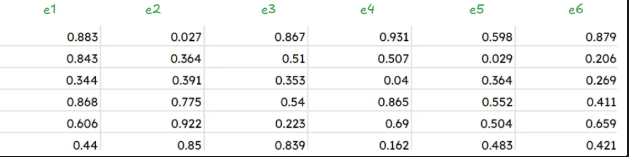
We now need to select a specific part from our dataset. Let’s choose
“Hello I am neuralnets you are”
We have selected our input, and we need to find an embedding vector for it.
We will be using a 6-dimensional embedding vector. The values of such vectors are always between 0 and 1 and will be defined at random at the beginning of our journey. We will be updating them as we go on.
Positional Embeddings
Consider two sentences,
i like pizza and like i pizza
The first one makes sense, while the second does not. The order of words, and the position of the words in a sentence, matter a lot. How do we incorporate this?
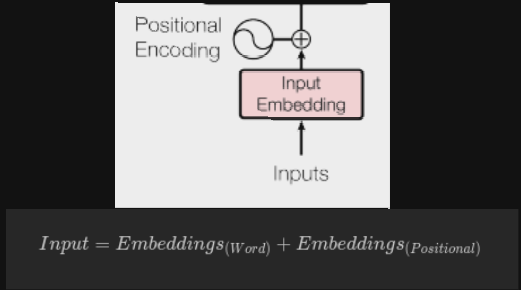
In RNNs, we take in each word by word, hence the issue of position never arises, but in transformers, we take the whole sentence together. We lose the sense of order for the words in the sentence. The most common solution is to add something to the Token Embeddings that will give the feel of a position
Approach 1
Let’s just add a position coefficient ranging from 0 to 1, to all the token embeddings. But no this approach is not good as we don’t know how long our input will be, so we can’t have a fixed positional embedding for this approach.
Approach 2
Let’s try to add the word position to each token embedding, but this is also dumb. In GPT, we might have input with a 100k size. While the token embedding is around 1, our positional embeddings will be 100k, which is not viable.
Approach 3 (Correct One)
Let’s notice that token embeddings are not a single value, but a \(d_{model}\) dimensional vector, and we just need to have the essence of position in the input position. So let’s devise a new positional embedding vector.
This is a sinusoidal form of positional embeddings, but why does it work?
Sine and cosine functions can be thought of as continuous analogs to binary bits:
- Sine and cosine oscillate between -1 and +1, much like how binary bits alternate between two states.
- By adjusting the frequency of these functions, we can create different patterns that mirror the way bits change in binary representation.
We could have used binary here as well, but binary representation is efficient for discrete values, using sine and cosine functions provides an alternative for representing continuous values.
What’s next?
For every word, we just add their corresponding word embedding to the positional embedding, hence we can say that we keep the dimensions of word embeddings equal to the dimension of the position vector.