how does interprocess communication work?
a guide to inter-process communication, pipes, message queues, shared memory, and synchronization
An operating system should keep its processes isolated from each other. Every process normally has its own virtual address space, stack, heap, etc., and at the end of the day, this isolation is needed as well. Let's say there is a bug in Chrome today. That should not shut down your Codex, but do we really need complete isolation?
A browser might use separate processes for tabs and extensions. A web server may communicate with databases and logging services. A CLI might connect multiple programs in a single pipeline. You need some kind of interconnectivity as well, because if you're building a complex system, completely isolating every process is not really useful.
To solve this issue, operating systems provide inter-process communication, or, in simple words, IPC. IPC is a collection of many things that allow processes to:
- exchange data
- notify each other about events
- coordinate execution timelines
- share resources
- synchronize access to shared data
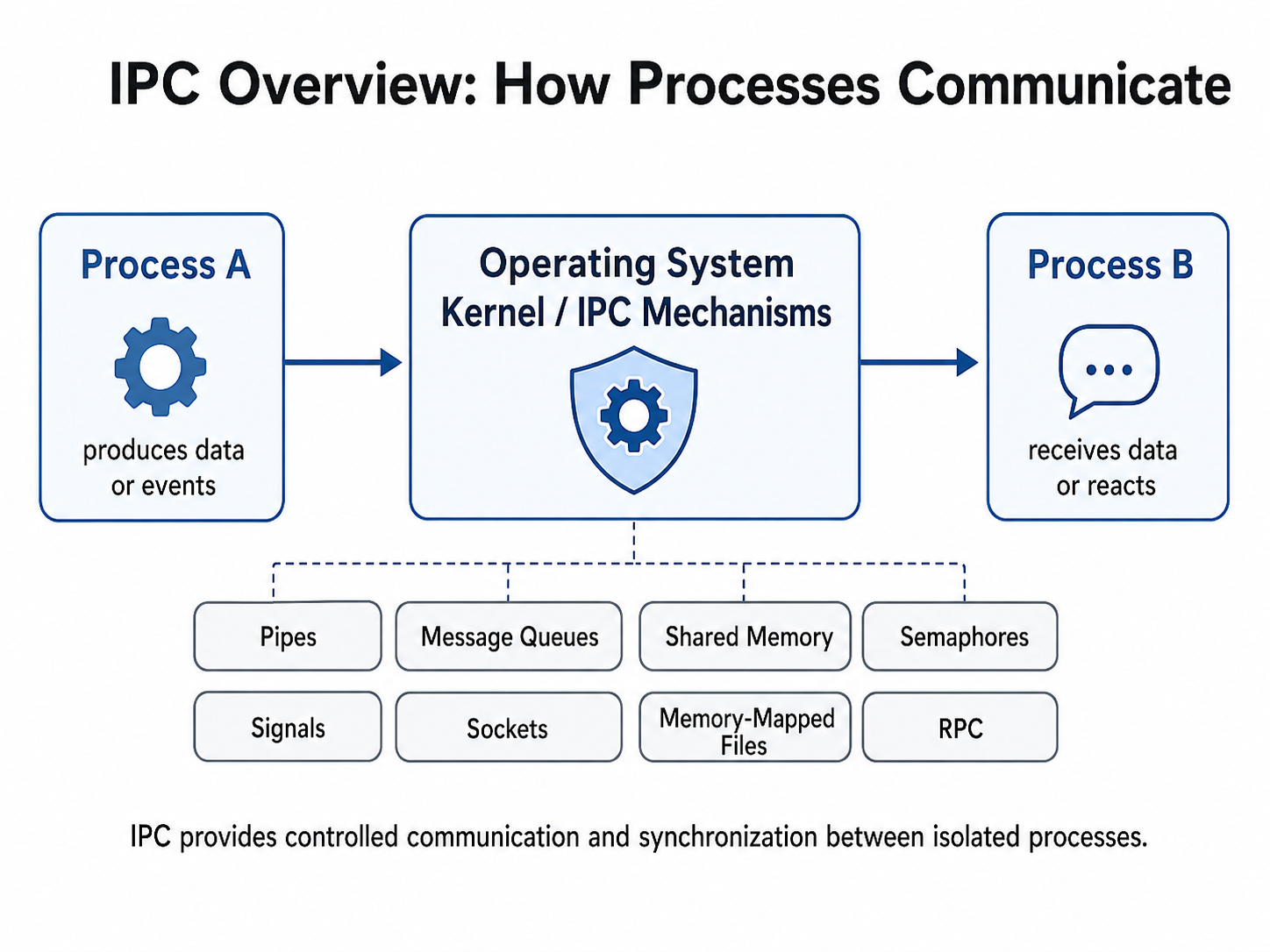
Why can’t processes directly communicate?
Suppose process A stores a variable at virtual address 1000. Process B also might have some data at virtual address 1000, but the two addresses do not refer to the same physical memory, right? The virtual memory gives each process an isolated point of memory.
Hence, process A cannot communicate with process B simply by writing to one of process B's addresses. Instead, both processes should have some kind of system controlled by the operating system that helps them communicate. As you will see in the diagram above, there are many such examples which are available as IPC mechanisms.
Pipes
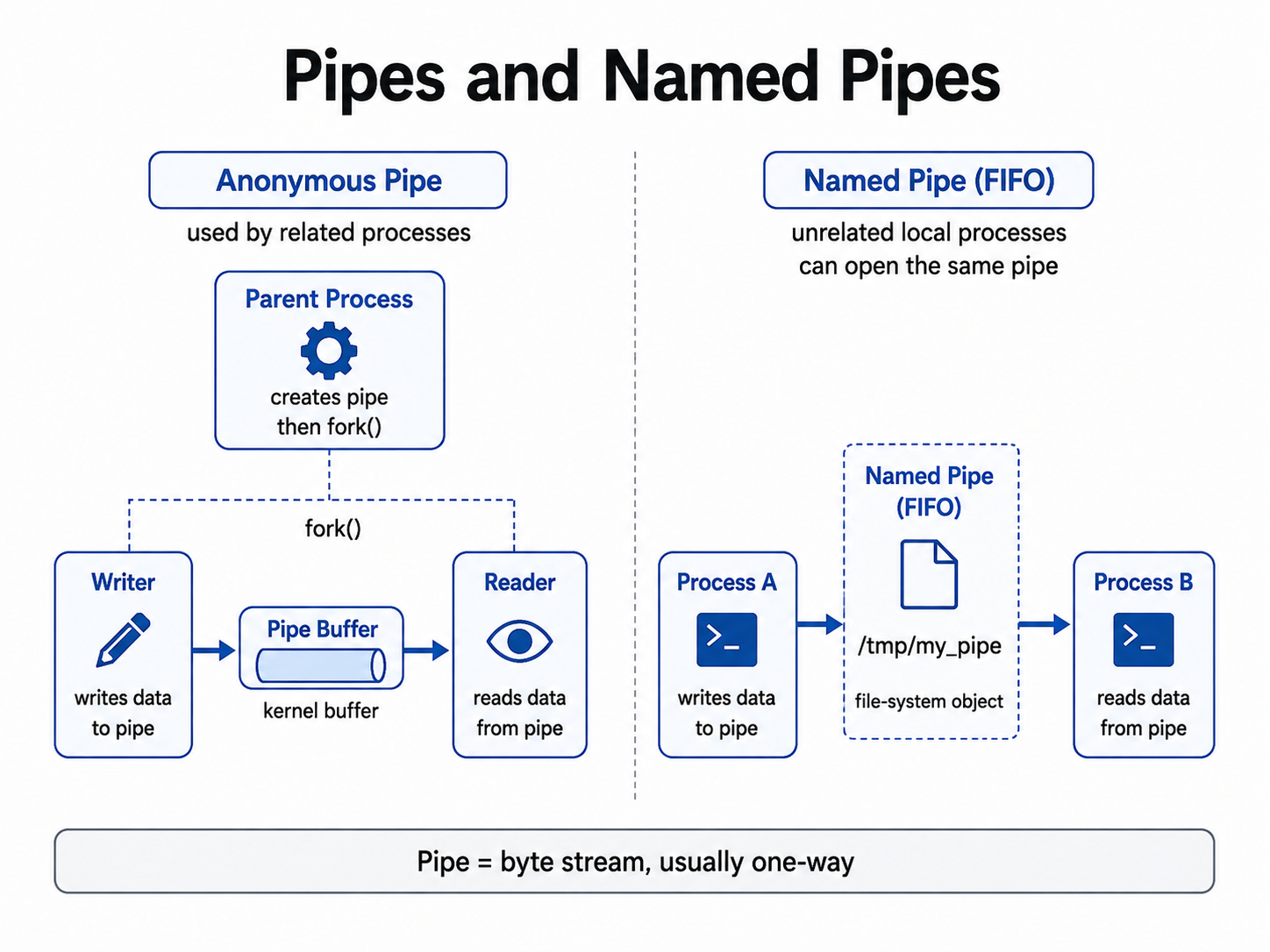
Pipes are one of the easiest ways to implement IPC. It just creates a stream of bytes between two processes. One process writes the bytes into the pipe, and another process reads the bytes from that pipe. In the middle, they have something called the pipe buffer that stores the bytes. Meanwhile, the pipe buffer is maintained by the operating system.
When the writer calls write, the kernel copies the data from the writer's memory into the pipe buffer. When the reader calls read, the kernel copies data from the pipe buffer into the reader's memory. This is mostly a one-way communication channel. If you need a two-way scenario, then you need to create two different pipes.
Anonymous Pipes
Anonymous pipes are usually used between closely related processes, like a parent and child. In a Unix-based system, what happens is the parent process first creates a pipe before calling fork. After the fork, both processes inherit the file descriptors that are in that shared pipe. A very simple example of a pipe would be this code segment.
cat file.txt | grep "error"In this, the output of cat is connected to the pipe, while the input of grep is connected to the other end.
Named Pipes
A named pipe is basically a pipe with a name in the file system. For example, /tmp/my_pipe. Because the pipe has a name, unrelated local processes can open it and communicate using it. It's like a file system object, but data normally passes through a kernel-level pipe buffer rather than being stored as a file.
Fun Fact about Pipes
In simple words, a pipe is a byte stream. It does not automatically understand any of the messages, objects, or records. If one process writes data in these chunks:
HELLO
WORLD
The receiving process may also read it in different chunks, like:
HELL
OWOR
LD
Message Queues
Message queues allow processes to exchange separate messages instead of having an unstructured stream of bytes. A process sends a message into the queue, and another process receives it. The queue may be managed by the kernel or by a separate message broker system, depending on what system you are using.
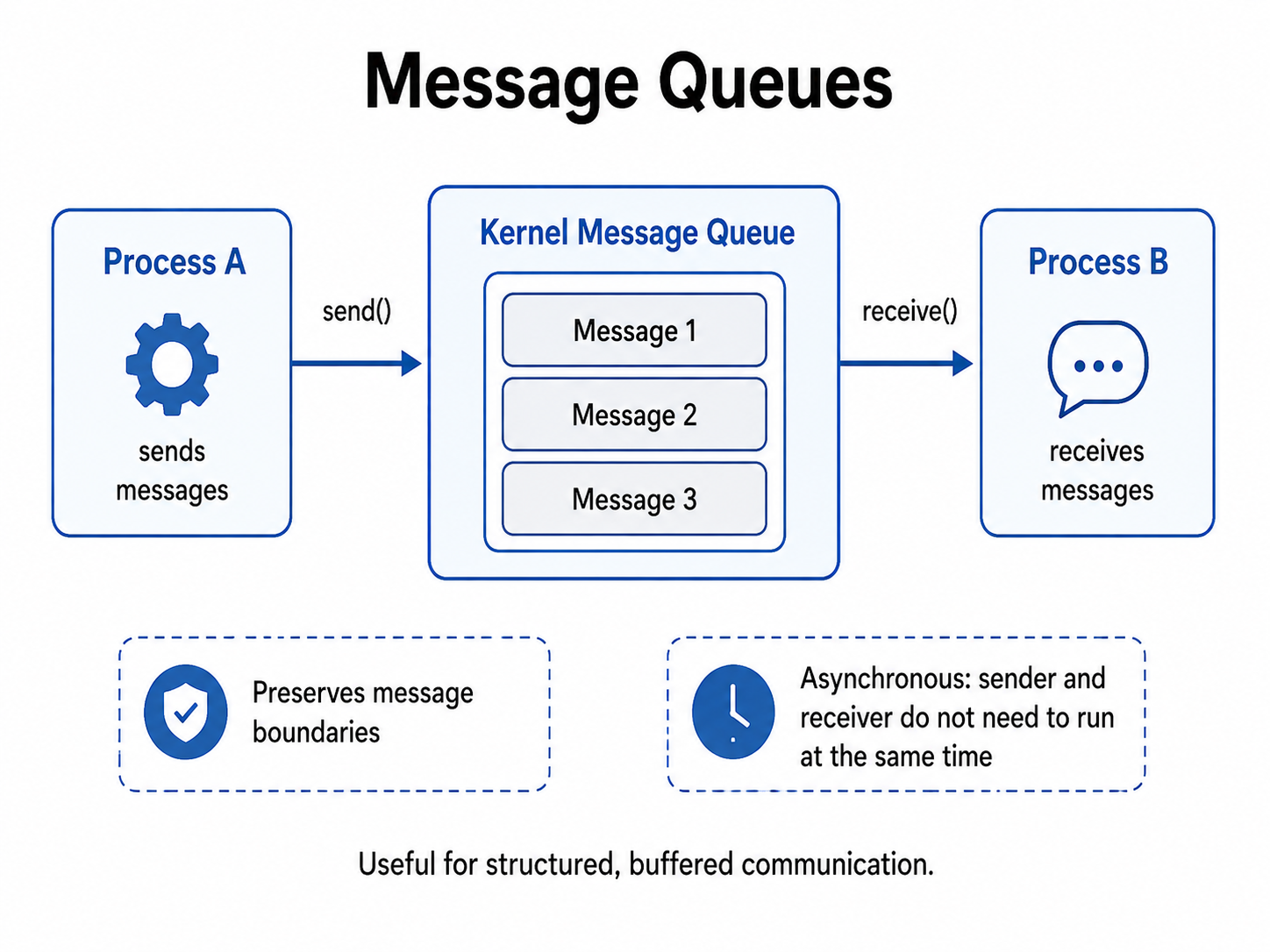
Unlike pipes, message queues preserve message boundaries, so if process A sends three individual messages, process B can retrieve them as three individual messages as well. Messages can also have metadata like message type, priority, timestamp, etc.
Asynchronous Communication
The sender and receiver need not always run at the same time. Process A can put a message in the queue and just do whatever it wants to do, while process B can later, at any time, retrieve the message as well. This makes the message queue much better than a pipe because you can have a logging system, background job processing, and many other systems that need an async flavor.
Again, one big problem is that the queue has limited capacity, so if it becomes full, the sender may block or fail until space is available.
Shared Memory
Shared memory allows multiple processes to access the same physical memory. Normally, Process A and Process B have separate virtual address spaces, but with shared memory, the kernel maps the same physical memory frames to both processes. The virtual addresses need not be the same, but the main thing is that both virtual addresses should map to the same physical frame.
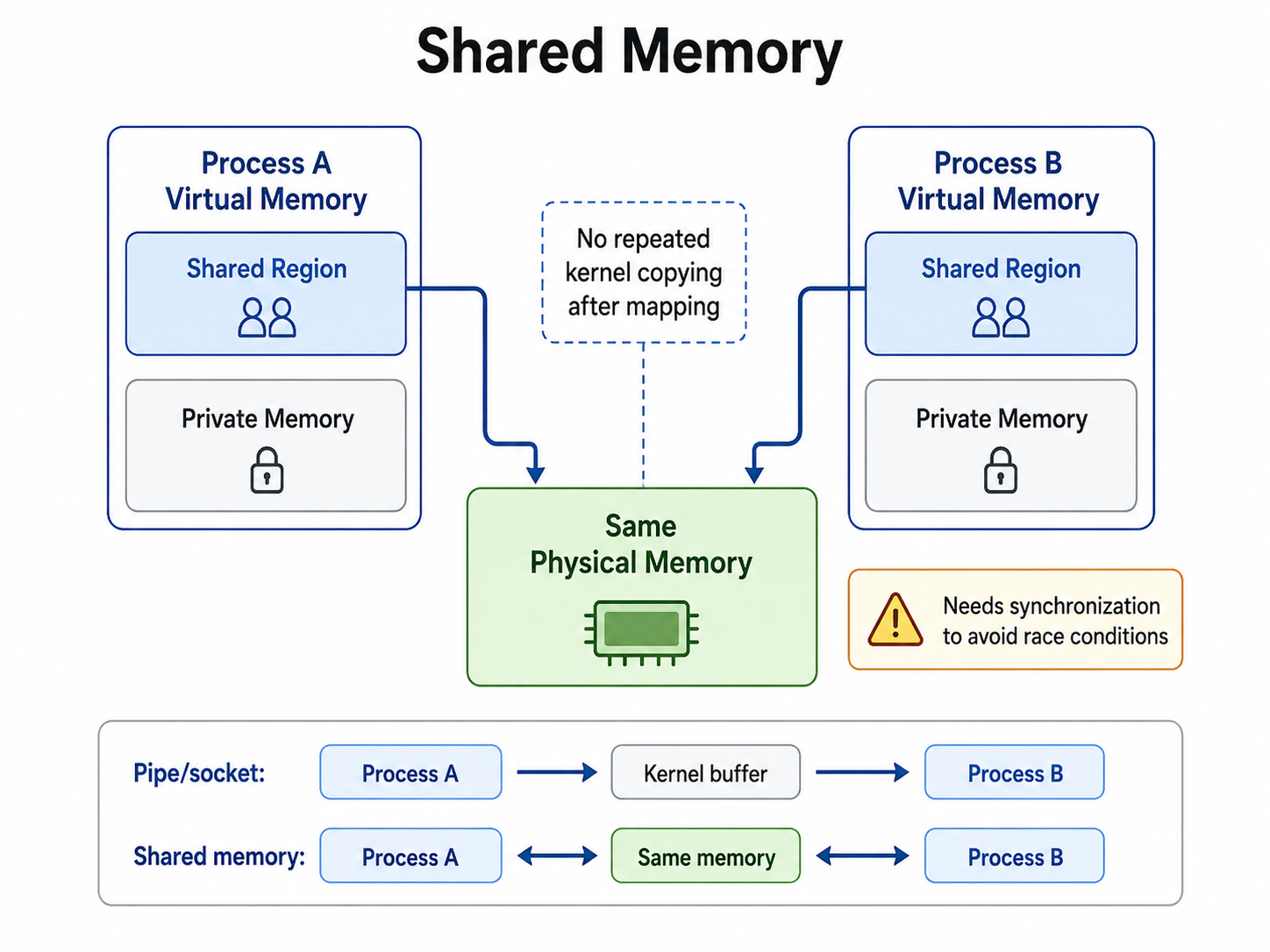
Once you have created shared memory, process A can write directly into it. Process B can read the same data. This is one of the fastest IPC mechanisms that we use for transferring large amounts of data.
How do we implement this?
In C, we use POSIX APIs to do this:
- We call
shm_openthat opens a POSIX shared memory object. - We use
ftruncateto set the size of the shared memory. - We use
mmapto map the shared memory into the process's virtual address space. - If you want to remove the mapping, you use
munmap, and if you want to unlink the shared memory, then you doshm_unlink.
These are the tools we use to implement shared memory in real C programs. If you want to read more, you can read this one page. shm_overview(7) - Linux manual page
Synchronization problem
Shared memory creates a very important problem: both processes can access the same data at the same time. Suppose you have a shared counter variable, c, that is equal to 10. Both processes do c = c + 1. Now the operation is three steps:
- Read the current value.
- Add one.
- Write the new value.
Both processes might read 10, calculate 11, and write 11, but what was my expected result? My expected result was 12, but one update was lost. This is what we call a race condition.
Now we need many synchronization mechanisms to fix this, like:
- mutex
- semaphore
- condition variables
- read/write locks
- atomic operations
Fixing race conditions
Critical Section Problem
When multiple processes or threads share data or a resource at the same time, it is called the critical section problem. The part of the program where the shared data lives is called the critical section. You can write the structure like this.
do {
entry section
critical section
exit section
remainder section }
while (true);
Our goal is to design a mechanism that controls entry into the critical section so that the concurrent processes do not create race conditions or corrupt shared data.
Our solution should satisfy 3 conditions:
- Mutual exclusion: only one process can be inside the critical section at a time.
- Progress: if the critical section is empty and some processes want to enter, one of them should eventually be selected to enter the critical section.
- Bounded waiting: a process requesting entry should not be forced to wait forever, and it should enter the critical section in some bounded amount of time. If it does not do so, this thing is called starvation.
Peterson’s Solution
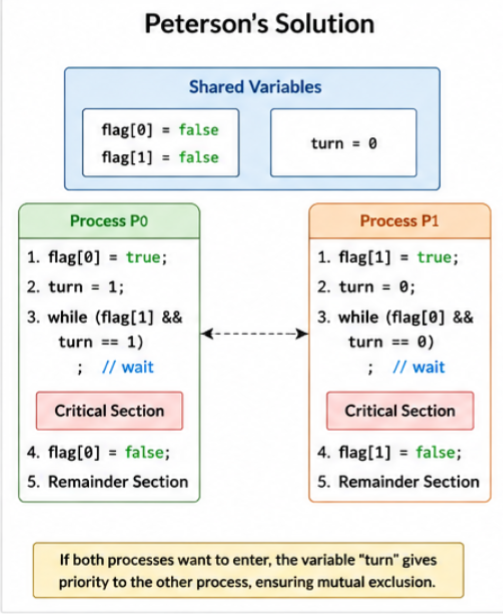
This solution is only for two processes. Suppose there are two processes, p0 and p1, and the Peterson solution uses two shared variables: a boolean flag[2] and an integer called turn. The flag array will record whether a process wants to enter the critical section. For example, if flag[0] is true, that means p0 wants to enter. The turn variable is used when both the processes want to enter at the same time, but it shows whose turn it is now.
flag[i] = true;
turn = j;
while (flag[j] && turn == j) ;

critical section

flag[i] = false;

remainder section
For process P_i, this is Peterson's solution.
The process first announces flag[i] = true, which means it wants to enter the critical section. Then it gives the other process priority by making turn = j. The process waits while flag[j] is true and turn is equal to j. That means the other process also wants to enter, but currently it has priority. If both processes try to enter simultaneously, the turn variable will break the tie.
Suppose both P0 and P1 want to enter. Both will set the flag values as true, but the turn can only hold one value. Therefore, the process waits, and the other process will enter the critical section. As the process leaves, it executes flag[i] = false, allowing the other process to come.
Both processes cannot enter the critical section simultaneously, so it satisfies mutual exclusion. If the critical section is empty and one or both processes want to enter, one of them will always be allowed to proceed. Progress also holds, but once a process declares its intention to enter, the other process cannot repeatedly enter forever, right? If one enters and exits, the other can enter. There is bounded waiting, so it satisfies all three criteria.
Test and Set
Test-and-set is a hardware-supported atomic instruction, and it shows the idea behind locks. What do I mean by atomic? When something happens as one indivisible operation, the operation is atomic. A simplified form of test-and-set would look something like this.
boolean test_and_set(boolean *target)
{
		boolean old = *target;
		*target = true;
		return old;
		}
The key part here is reading the old value and setting the new value. These two things happen atomically. Suppose lock = false. A process can attempt to enter the critical section using
while (test_and_set(&lock)) ;

critical section

lock = false;
Initially, since lock = false, the first process executes test_and_set. It receives false and immediately changes the lock to true. Because the return value was false, the process exits the loop and enters the critical section. If another process executes test_and_set while lock = true, then the instruction returns true. Therefore, the second process remains inside the while loop and repeatedly checks the lock. This system is called busy waiting, or spinning.
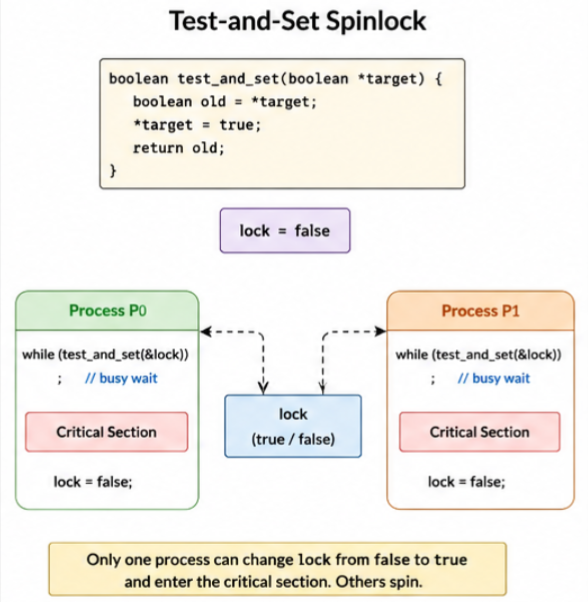
Since this system is atomic, only one process can observe the lock as free and successfully acquire it, so it's mutually exclusive. When the lock becomes free, one of the competing processes can acquire it, so progress also holds, but there is no guarantee which waiting process will get the lock next, so there is no bounded waiting, for example.
P0 waits
P1 releases lock
P2 acquires lock
P2 releases lock
P1 acquires lock
...
P0 may continue waiting
So here we can see starvation.
Compare and Swap
This is an upgraded version of test-and-set. Here we have three values:
- the memory location
- the expected value
- the new value
Conceptually, the code looks something like this.
int compare_and_swap(int *value, int expected, int new_value)
{
    int old = *value;
    if (*value == expected)
        *value = new_value;
    return old;
}
As you can see, this process is also atomic. Suppose the lock is equal to zero. In this case, zero means unlocked and one means locked. The process acquires a lock using this piece of code.
while (compare_and_swap(&lock, 0, 1) != 0);

critical section

lock = 0;
In simple words, the operation means: if the lock is currently set as zero, change it to one. If the lock was zero, the process successfully changes it to one and enters the critical section. If it was already one, the comparison will fail, and the process keeps waiting in the while loop.
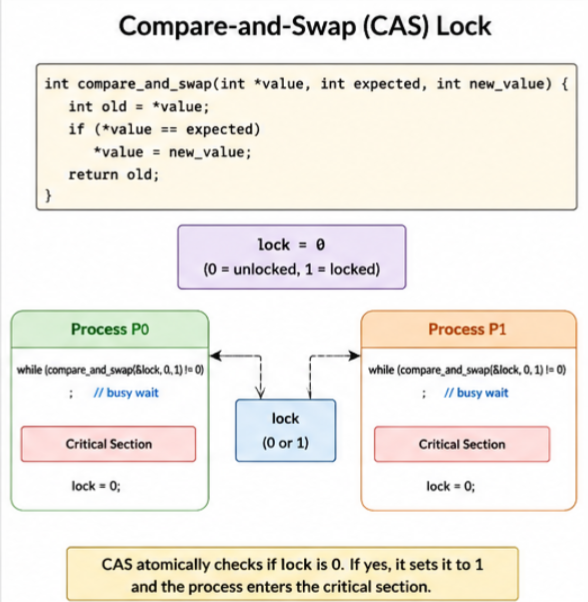
You would notice that this is more flexible than test-and-set because it performs an update only if the current value matches the expected value. When we use this to implement a lock, only one process can atomically change the lock from zero to one, so this is mutually exclusive. When the lock becomes available, one of the processes attempting this will acquire it, so progress holds as well. In the same test case, there can still be starvation, so bounded waiting is not satisfied.
Mutex Locks: Acquire and Release
A mutex lock is a much simpler abstraction for this critical section problem. It has two fundamental operations: acquire and release. A code snippet to use this would look something like this:
acquire();

critical section

release();
The idea is simple: before entering the critical section, we attempt to obtain the ownership of the lock and After leaving, release gives them the ownership. Basically, the mutex will have two states: unlocked and locked. If the mutex is unlocked, the process will acquire them. Then the mutex becomes locked and goes to the critical section. If the process calls acquire while the mutex is locked, it must wait.
acquire() { while (test_and_set(&lock)) ; }
release() { lock = false; }
You would see that the process will continuously check for a lock, so create something called a spinlock. If you implement it correctly, the mutex will guarantee that only one process owns the mutex at a time, so it is mutually exclusive. When the mutex is released, another waiting process can acquire it, so progress is also there.
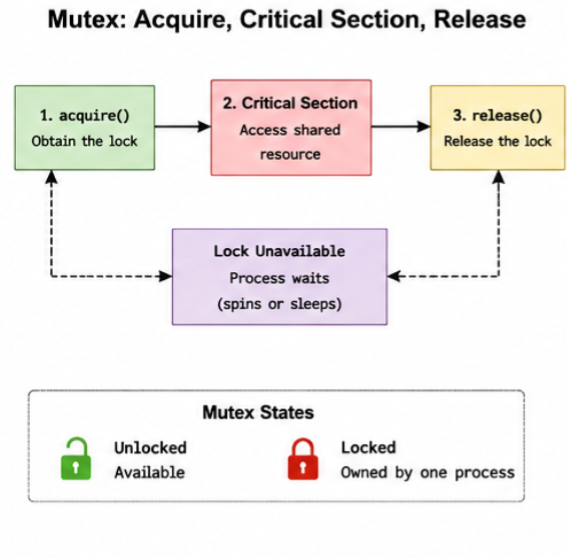
A simple spinlock, like the earlier cases, will not provide bounded waiting, but a good mutex with bounded waiting, even implemented with a simple bit of code, just has to implement with a queue. It then grants the mutex in order, so there is bounded waiting as well in that case. If it's a very simple spinlock, like the earlier cases, there is no bounded waiting.
Semaphores
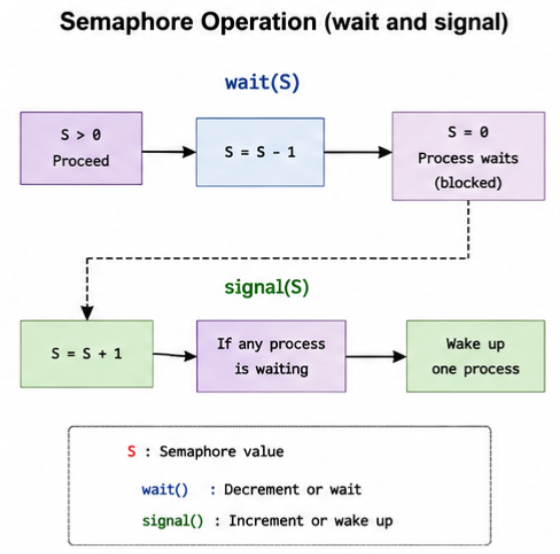
It's a special kind of synchronization mechanism. It does not usually transfer application data. A semaphore kind of maintains an integer value, which is modified through atomic operations. It has two kinds of operations: wait and signal. The wait operation attempts to decrease the semaphore. If the operation cannot proceed, the process may be placed into a waiting state. The signal operation increases the semaphore and will wake up any one of the waiting processes. We have two kinds of semaphores.
Binary Semaphores
It has two values, 0 and 1, and it is used similarly to a mutex, so an example is
wait(mutex);

critical section

signal(mutex);
Initially, mutex is set as 1, so the resource is available. The first process will do wait(mutex), causing mutex to go from 1 to 0. Another process attempting wait(mutex) then must wait till the first process executes. The signal will again increase the mutex from 0 to 1, and the earlier waiting process can now enter.
Counting Semaphores
Counting semaphores is a special control semaphore where there are multiple instances of a resource. Suppose our system has five identical resources. It will initialize the resources equal to five, and each process will perform wait resources before using one of them. When it is finished, it will signal resources that will return the resource. The semaphore will maximum allow the number of resources you have at the same time.
Producer Consumer Problem
Consider a shared buffer with five available slots. A producer adds an item to the buffer, and the consumer removes them. The program will have three synchronization values:
- EMPTY = 5
- FULL = 0
- mutex = 1
EMPTY will actually count the available slots. FULL will count the total occupied slots, and mutex is basically ensuring only one process modifies the buffer at a single time.
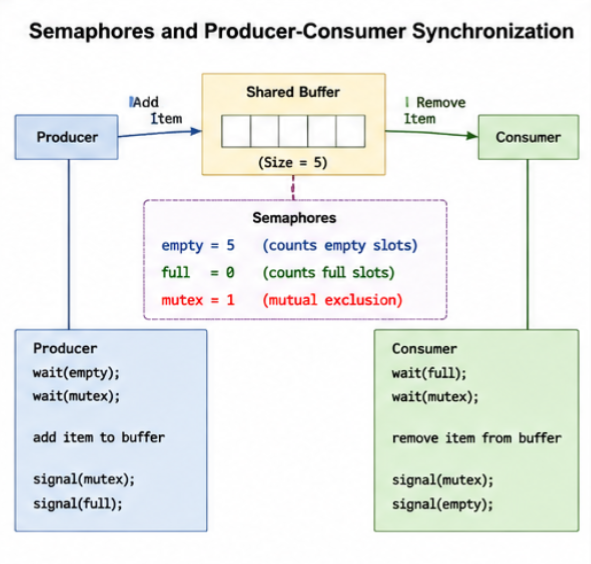
//producer code
wait(empty); wait(mutex);

add item to buffer

signal(mutex); signal(full);

//consumer code
wait(full); wait(mutex);

remove item from buffer

signal(mutex); signal(empty);
If the buffer is full (equal to 0), the producer will wait. If the buffer is empty (full = 0), the consumer will wait. The mutex semaphore will ensure that the producer and consumer don't modify the shared buffer at the same time.
When we have a binary semaphore, only one process enters, so you would say it has mutual exclusion. A counting semaphore kind of allows a lot of processes at the same time, so it's technically not mutually exclusive. Whenever the semaphore is available, a waiting process is allowed to proceed, so there is progress. Again, if you are using a fair queue like the earlier case, then only there is bounded waiting. Otherwise, there is not.
Signals
Signals are small notifications that are sent to a process. They tell the process an event occurred. They are not usually used for sending large amounts of data. For example, a child process has been terminated. This would be a signal.
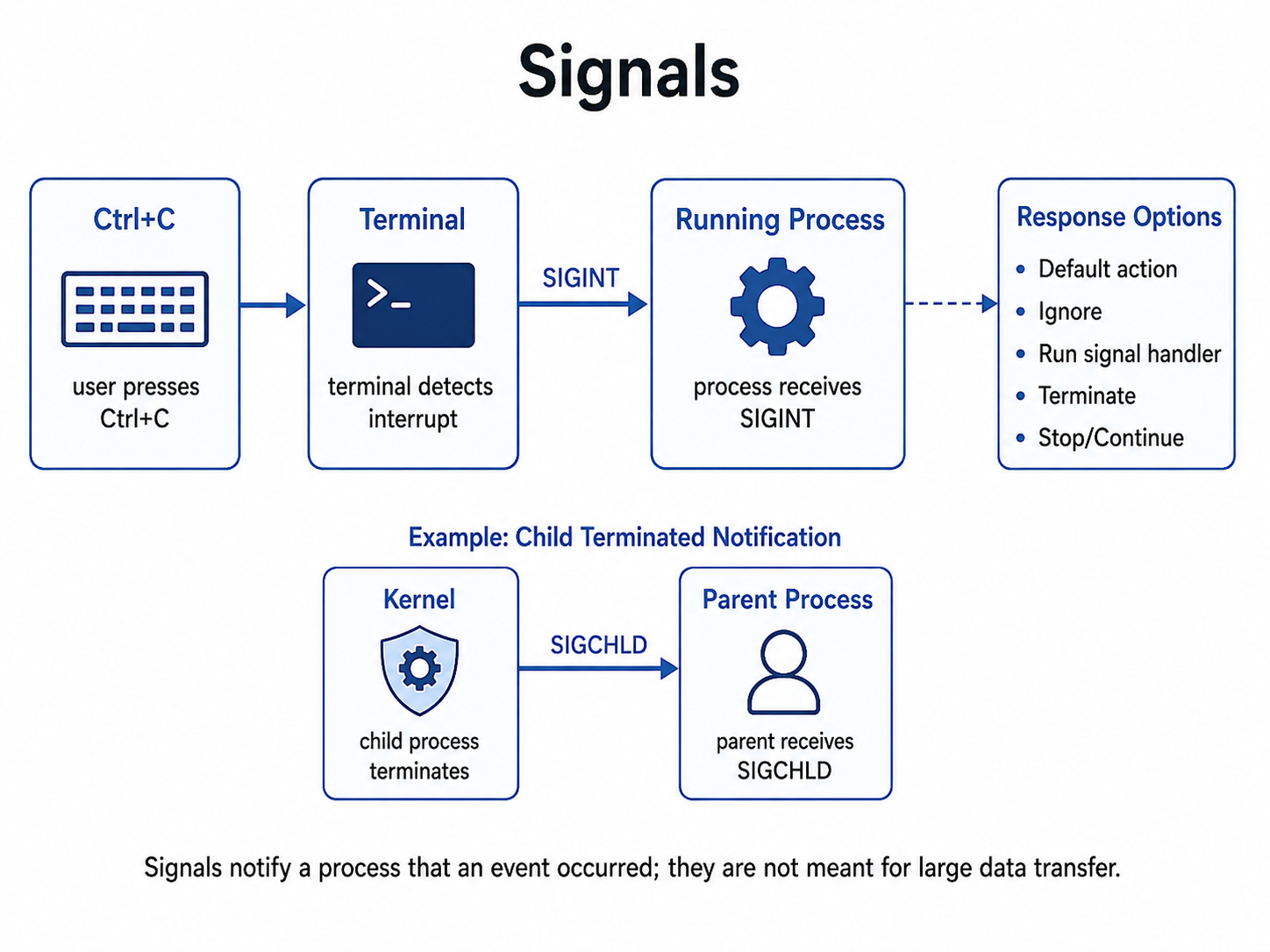
For example, in Linux, when you press Control+C, the keyboard sends a Control+C to the terminal. It means it will give us a SIGINT to the foreground process. Each kind of signal has come from the process to do some kind of activity. You must always write signal handlers carefully because a signal might interrupt a process while it is executing some kind of code, and some of the processes are safe to actually interrupt, but not all.
Sockets
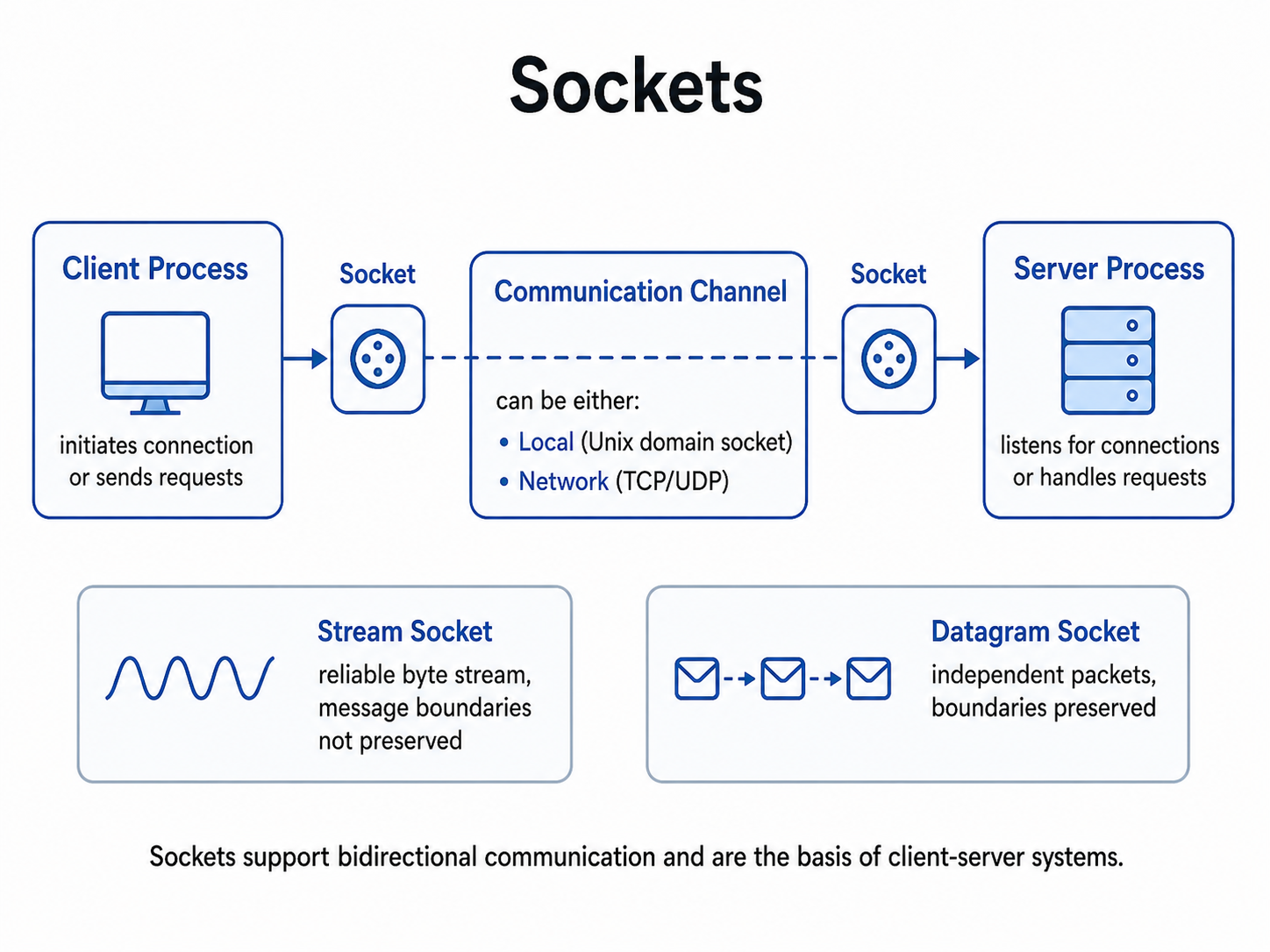
Sockets are used for bidirectional communication between processes. It can be used between processes on the same computer, but also can be used across computers as well.
Local Sockets
Unix sockets allow processors on the same machine to communicate bidirectionally using the socket programming interface. They are usually used for databases or containers. Since the communication is local, the operating system saves some networking overhead.
Network Sockets
Network sockets are for two different machines, you can use stream sockets or datagram sockets for each of them.
Stream Sockets
Stream socket sends an ordered stream of bytes. For example, TCP is an example of a stream socket. They will guarantee that the bytes will always arrive in order. For example, if I give you this code: send("hello world"), the receiver may obtain "hello world" or even smaller codes. There has to be some kind of protocol that helps to identify if the complete message has come or not.
Datagram Sockets
Datagram sockets transfer independent packets. UDP is an example of datagram sockets. Message boundaries are preserved, but the delivery is not guaranteed. Packets might be lost or received out of order. It is mainly used for, let's say, videos. If you are displaying videos, if you are streaming some videos, some frames might get lost.
Memory Mapped Files
Memory-mapped files map all or some part of a file into a process's virtual address space. Instead of calling read and write many times, the process can access the file contents using normal memory operations. Two processes can map the same file and use it as a shared communication place.
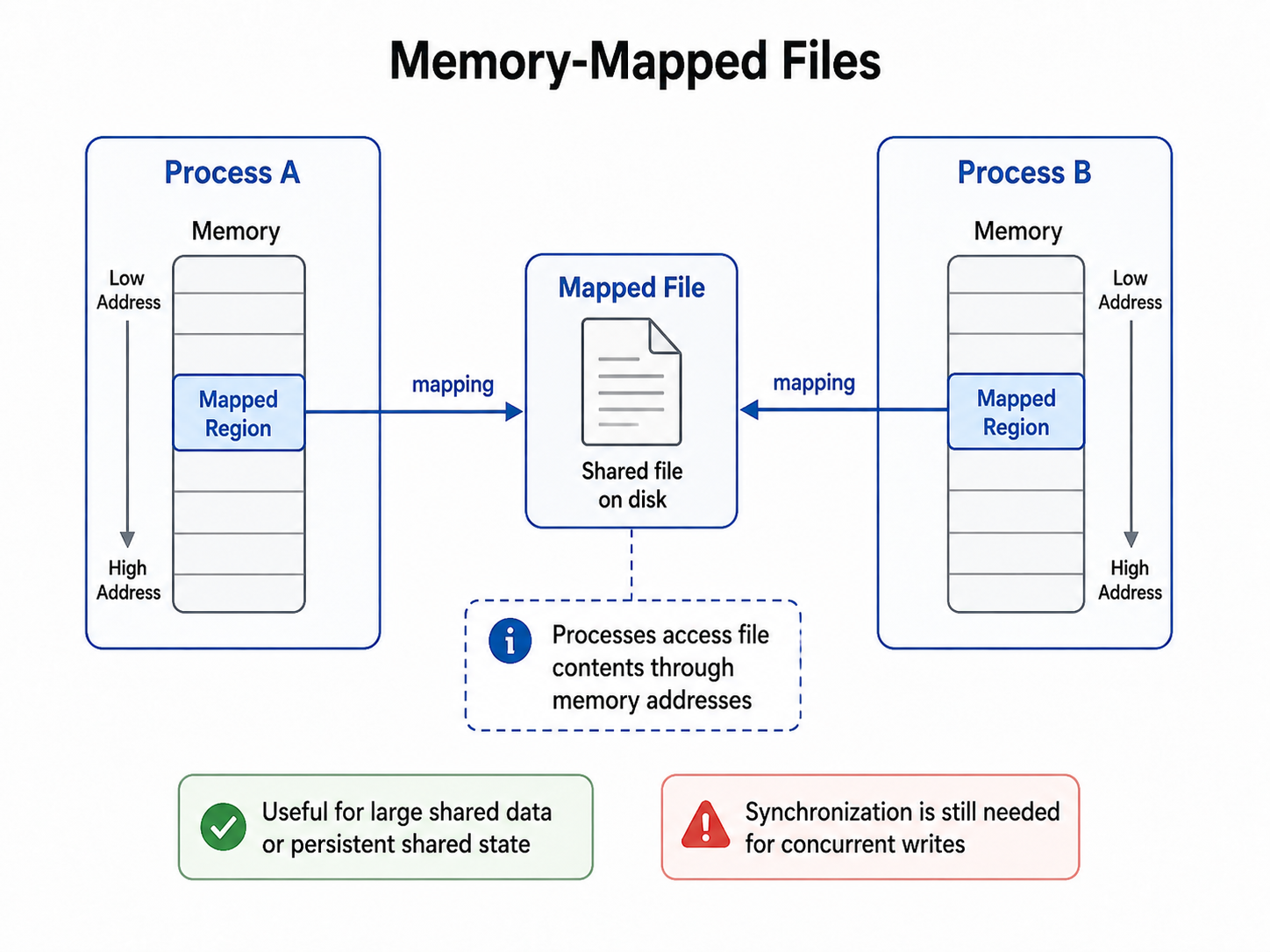
The OS loads these file pages into physical memory, where they are accessed from. When can these be useful? Let's say there are large datasets the process needs to see, or some application needs access to some large files. These are the cases when these can be used.
Now, what is the difference between this and shared memory, then? The main difference is that a memory-mapped file has a file-backed representation that may be on the storage itself, and you do need to do synchronization here as well.
Remote Procedure Calls
Remote Procedure Calls or RPCs are very similar to an ordinary function call, so the client will write something like
result = calculate_price(product_id)But this calculate price may actually execute inside some other process.
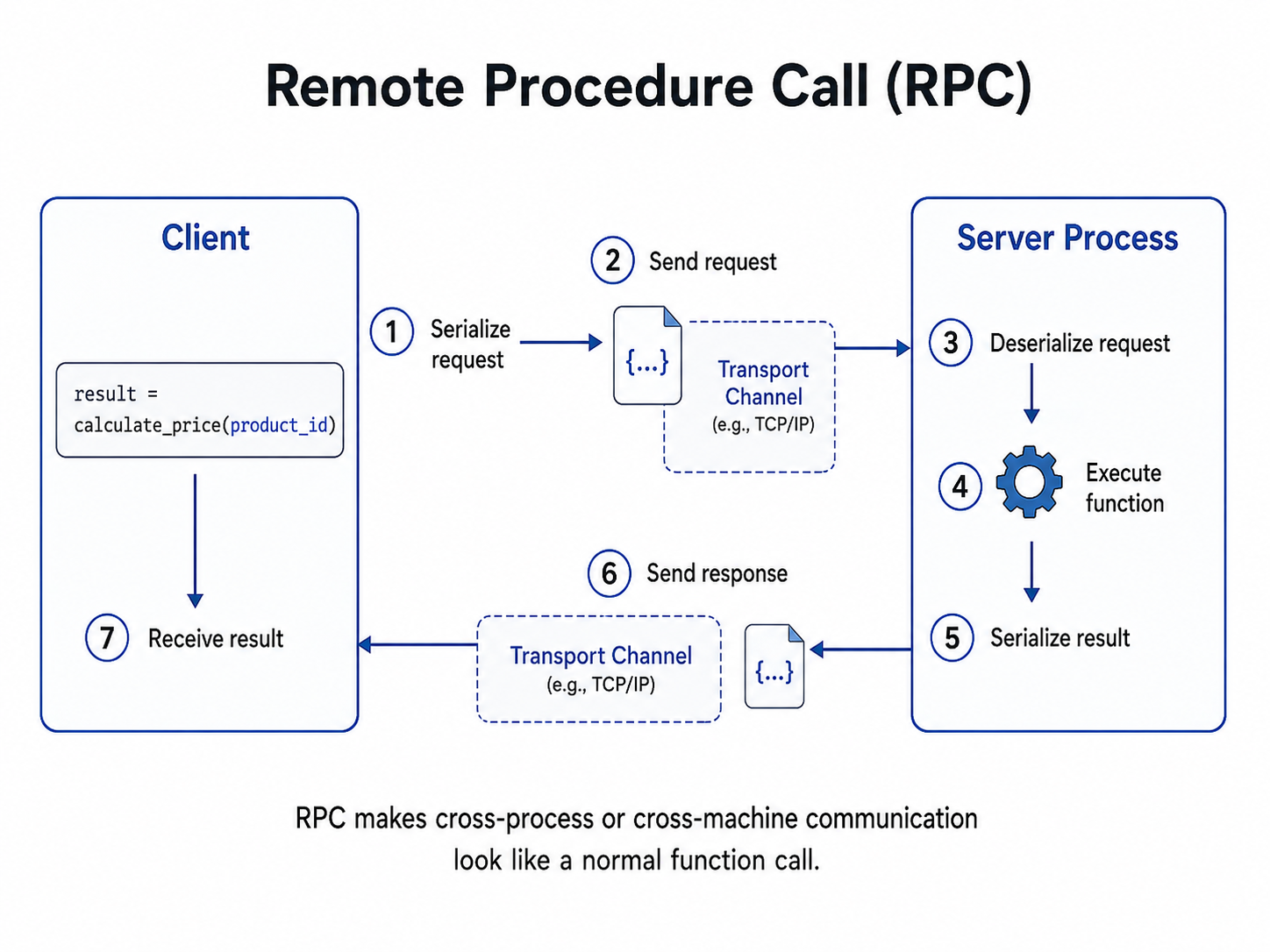
Behind the scenes, the RPC will do these steps:
- The client will create a function call.
- The RPC library serializes the function name and arguments inside it.
- The request is sent through a socket or any kind of different transport you want to do.
- The server will deserialize the request.
- The server will execute the function.
- The server will serialize the result.
- The response is sent back to the client.
- The client deserializes and receives the result.
Blocking and Non Blocking IPC
Blocking Operations
A blocking operation is an operation that will wait till it can make progress. For example
data = read(pipe)If the pipe is empty, the process may sleep till the data arrives. Similarly, writing to a full pipe might block till some other process reads that data. This is a very simple concept, but it might happen that a process will be stuck on some channel forever or something.
Non-Blocking Operations
These kinds of operations return the value immediately. If there is no data, the operation will return an error or some special message that the process is not working right now and should work later.
When to use what IPC
| Mechanism | Best use | Main limitation |
|---|---|---|
| Anonymous pipes | Simple communication between related processes | Usually local and stream-based |
| Named pipes | Communication between unrelated local processes | Limited communication model |
| Message queues | Structured and asynchronous communication | Queue capacity and management overhead |
| Shared memory | Fast transfer of large amounts of data | Requires synchronization |
| Semaphores | Coordinating shared-resource access | Does not transfer application data |
| Signals | Event notification and process control | Carries very little information |
| Sockets | Client-server and network communication | Protocol and serialization overhead |
| Memory-mapped files | Large or persistent shared data | Concurrent writes require synchronization |
| RPC | Service-to-service communication | Remote failures and latency |
Finally
IPC exists just because an operating system, as much as it requires isolation, also requires cooperation. At the highest level, nearly every IPC mechanism follows the same pattern:
- A process A produces some data or event.
- There is some controlled communication mechanism.
- Process B receives this data and reacts.
Every process is kinda similar. The only main difference is:
- how the data is represented
- where it is stored
- how much the kernel is involved
- whether communication is local or remote
- especially how synchronization is handled